How-To: Manage the Datastore
The Keyserver Datastore can be used to securely store values that applications, CI/CD pipelines, or other systems need to retrieve at runtime, such as:
- Symmetric encryption keys
- Certificates
- API tokens
- Other sensitive values
This can be useful when you want to avoid storing such values directly in source control or other less suitable locations. Each value is available only to clients whose assigned role grants access to it.
Values are encrypted at rest and returned only over an authenticated TLS API call.
Who can read a stored value
A key administrator with access to an entry can reveal its plaintext in the Datastore edit form. That administrator's browser and workstation are therefore inside the secret's trust boundary. Scope Datastore permissions accordingly, and use your platform's own secret manager for secrets that must never be visible to a Keyserver administrator.
Prerequisites
- Access to the Keyserver UI at
https://keyclient.<UNIQUE-ID>.cryptera-security.io - A subject whose role includes the
keyadminNature. Granting client access also needsuseradmin: the role form lists entries only for a subject that also holdskeyadmin(orreviewer) - An active administrative session
- For granting client access: the client's role must already exist. See Manage Roles in the Keyserver.
Create an entry
- In the navigation bar, click Datastore.
- Click Create.
- Fill in the form. The fields are described below the steps.
- Click Save.
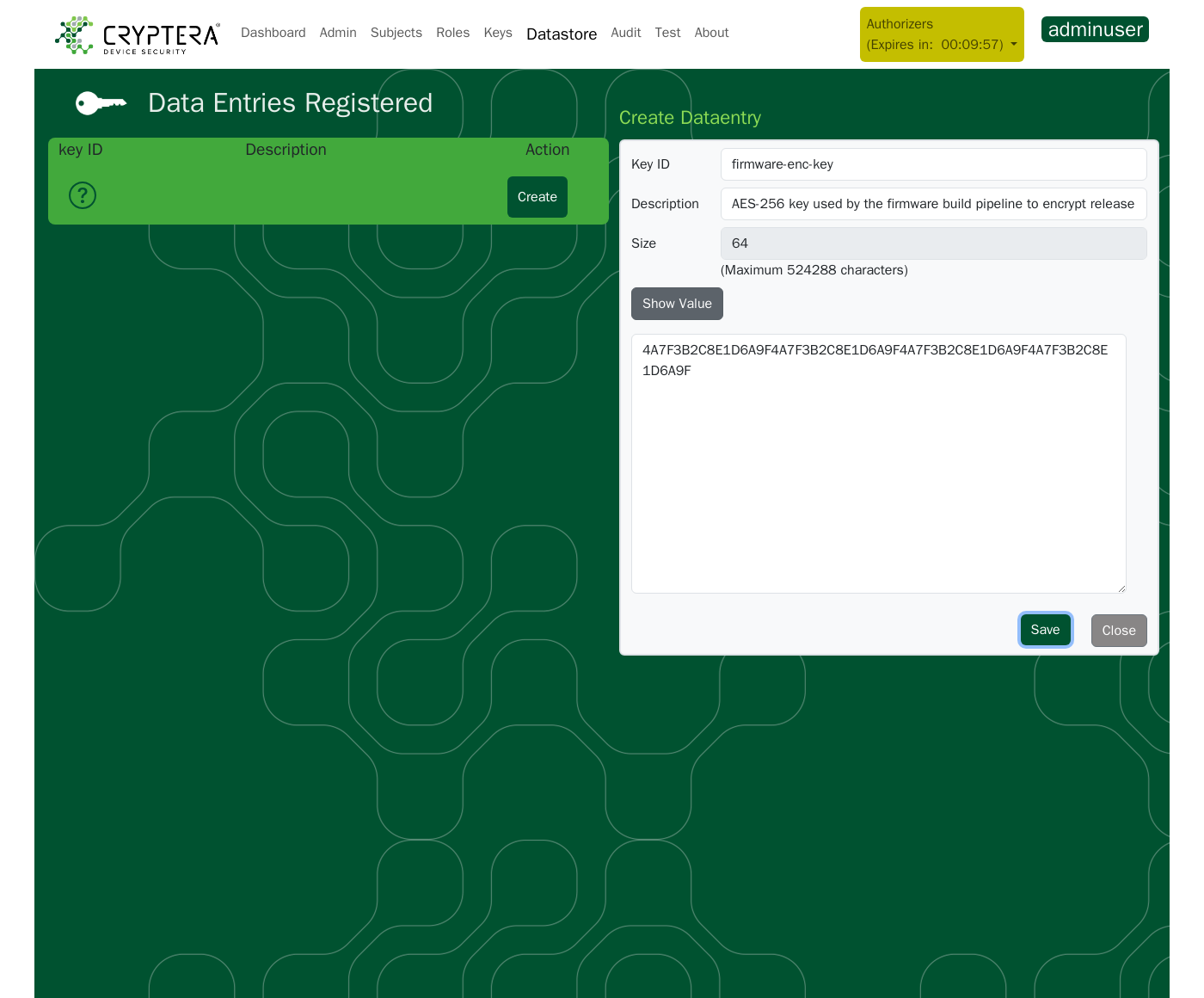
| Field | Description | Constraints |
|---|---|---|
| Key ID | The identifier clients use in the API (/api/datas/{keyid}) | 4–64 characters, cannot be changed after creation |
| Description | What the value is for, who rotates it, and how often | 16–256 characters |
| Value | The secret to store (click Show Value to open the field) | Encrypted at rest |
The entry appears in the Datastore list. The list does not show the value; the pencil icon, then Show Value, does.
A new entry is not readable by any client yet
No client can fetch the entry until a role grants access to it. Grant it on the client's role, as described in Grant a client access to an entry.
Example entry:
Key ID:      firmware-enc-key
Value:       4A7F3B2C8E1D6A9F4A7F3B2C8E1D6A9F4A7F3B2C8E1D6A9F4A7F3B2C8E1D6A9F
Description: AES-256 key used by the firmware build pipeline to encrypt release packages
Grant a client access to an entry
Access is granted on the client's role, one permission per entry. A role can read only the entries ticked on it; there is no wildcard.
- Click Roles in the navigation bar, then the pencil icon next to the role the client uses.
- Expand Datastore Access Permissions (/api/datas/<keyid>).... It lists every datastore entry with a checkbox.
- Tick each entry the role must read (for example
firmware-enc-key). - Click Save.
The client can now fetch the value:
Response:
In a CI/CD pipeline:
SECRET=$(
  curl --fail-with-body -sS --tlsv1.3 \
    -H "Authorization: Bearer $TOKEN" \
    "https://keyserver.<UNIQUE-ID>.cryptera-security.io/api/datas/firmware-enc-key" \
  | jq -er .value
)
--fail-with-body and jq -e make the command fail on a 403 instead of leaving SECRET empty. Do not export SECRET; pass it only to the command that needs it.
Update an entry's value
Updating rotates the secret under the same Key ID, so clients do not change their API calls.
- Click Datastore in the navigation bar.
- Click the pencil icon next to the entry.
- Click Show Value and replace the value.
- Click Save.
The new value is stored immediately. The old value is gone: the Datastore keeps no version history.
Delete an entry
- Click Datastore in the navigation bar.
- Click the bin icon next to the entry.
- Click Revoke in the confirmation dialog.
After deletion, /api/datas/{original-keyid} returns 404. Clients that cached the value still have it. Deleting an entry also removes its access permission from every role, so there is nothing to clean up by hand.
Soft-delete and name reuse. Deletion renames the entry's Key ID to {original-keyid}-deleted-{timestamp} and marks the record cancelled. It disappears from the UI and the API. Re-creating an entry with the same Key ID creates a new, empty entry that no role grants; the deleted record is not recovered.
Tracing a deleted entry in the audit log. deletedataentry audit entries have keyid=null, and the audit log cannot filter on objectid. Open the entry's adddataentry audit entry (filter by its original Key ID) and note its objectid. Afterwards, filter on API Name deletedataentry and a date range, and match the objectid.
Audit trail
Every datastore operation is recorded in the audit log under these apiname values:
| Operation | apiname | data field |
|---|---|---|
| Create entry | adddataentry | SHA-256 hex of the secret, never plaintext |
| Update entry value | updatedataentry | SHA-256 hex of the new secret, never plaintext |
| Delete entry | deletedataentry | null; keyid is also null (renamed on delete) |
| Client fetches value | getdata | null; the response content is never recorded |
The hash lets you check when a specific value was written without exposing it. Field rules for every apiname: Audit Coverage Reference.
Best practices
- Use descriptive Key IDs that name the secret's purpose and scope, for example
fw-build-signing-passphrase,device-ca-root-passphrase,prod-s3-upload-key. - Rotate values regularly with Update an entry's value.
- Grant least privilege. Tick only the entries each client needs. Avoid one role with access to every entry.
- Clean up on offboarding. When retiring a client or pipeline, untick its entries on its role and delete entries only it used.
If something fails
| Symptom | Cause and fix |
|---|---|
Client gets 403 fetching an entry | The client's role does not have that entry ticked (Grant a client access to an entry) |
Client gets 404 for a previously working Key ID | The entry was deleted and its Key ID renamed (Delete an entry) |
| Audit log shows a hash instead of the stored value | By design: writes are logged as the SHA-256 of the secret (Audit trail) |
Full status-code reference: Error Codes.
Related pages
- Manage Roles: the roles that carry datastore access
- Audit Coverage Reference: datastore audit field rules